The briefing
GTA Online begins with a custom character and opens into Freemode, where exploration, businesses, missions and competitive activities coexist. New players on supported Enhanced editions can use Career Builder’s GTA$4,000,000 allocation to select an initial career. Other starting flows depend on edition and existing progress.
Learn the Interaction Menu early. The source lists M on PC, a held touchpad on PlayStation and the held View button on Xbox. Quick GPS helps find useful destinations, while the menu also controls equipment, appearance and communication settings. The in-game phone offers another route to contacts and jobs.
Cash buys assets and equipment; RP develops rank and associated unlocks. Missions, races and Freemode activities provide different combinations of both. Choose a manageable activity, learn its requirements and use the map legend to distinguish objectives from optional markers. Co-op jobs and public competition demand different preparation, so match your session and teammates to the task you actually want to complete.
Maps & reference images

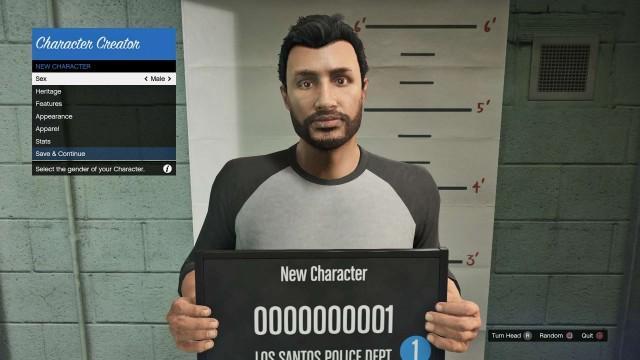


GTA Online: Complete Beginner's Guide To Freemode Getting Started in GTA Online The GTA Online Interaction Menu iFruit Phone & Jobs GTA Online Contacts GTA Online Jobs Browsing The In-Game Websites Making Money & Reputation Best Ways to Make Money in GTA Online Earning Reputation (RP) Spending Money HUD, Player Blips & Mental State GTA Online Crews & Friends Freemode Events & Challenges Points of Interest in GTA Online Freemode GTA Online Awards & Career Progress Getting Started in GTA Online When you first enter GTA Online, you’ll use the Character Creator to define your appearance, base stats, and starting outfit. In the Expanded & Enhanced editions of GTA Online for PS5, Xbox Series X|S and PC, the new Career Builder helps new players establish their foundation. You’ll start with GTA$4,000,000 and choose one of four criminal paths: Executive Gunrunner Nightclub Owner Biker After selecting a path , invest your funds into properties, vehicles, and weapons tied to your chosen career - setting you up for success in Freemode. Once you’re ready, you’ll drop into Freemode - the heart of GTA Online - where you can explore, run businesses, take jobs, or challenge other players across Los Santos. The GTA Online Interaction Menu The Interaction Menu is useful for everything from changing outfits to replenishing your ammo, including the Quick GPS feature, changing Voice Chat preferences, and more. Access this Menu by pressing M on PC, holding down the Touchpad on PlayStation, and holding the View button on Xbox. Be sure to spend some time familiarizing yourself with the Interaction Menu, and check out the below to learn more about some of its key features: Quick GPS: Use the Interaction Menu to access the Quick GPS function, which will help you find your way to useful locations more quickly. Inventory: Fill up on Ammo without having to visit Ammu-Nation in the Interaction Menu by selecting Inventory > Ammo, or protect yourself by equipping owned Body Armor and consuming Snacks. You can also keep track of any Collectibles (or Daily Collectibles) you’ve found within this menu. Style: Use the Style menu to equip Accessories such as owned Masks, change your Walk Style, open and close Jackets, and more. Passive Mode: If you need some time to explore without invasive interruptions, passive mode can be enabled to protect yourself from other players. While Passive Mode is active, players will be unable to attack you, and you will be unable to attack them or use Weaponized Vehicles. Vehicle Options: If you have a Personal Vehicle active, hit ‘Request Personal Vehicle’ to have the vehicle quickly delivered to your location. You can also request owned Aircraft and Special Vehicles, return your active Vehicle to Storage, and permissions for who can enter your personal vehicle, and more. Services: Manage your mobile properties - the Mobile Operations Center, Avenger, Terrorbyte, and Kosatka - including useful features such as calling an instant Sparrow Helicopter delivery from your Kosatka submarine. SecuroServ: A lot of missions and career paths in Los Santos will require you to be a VIP or CEO in various capacities to participate. Registering to become a VIP or CEO can open a lot of additional gameplay and opportunities. Motorcycle Club: Players who own a Clubhouse will have the option to register as an MC President under Motorcycle Club, which allows you to take on additional gameplay opportunities. Voice Chat: Choose who you would like to verbally interact with in game - talk with Friends/your Crew, the entire lobby, or turn off voice chat completely. Spawn Location: By default, when you launch GTA Online you will begin at your last location. If you own a property, you can pick which one to start from. Impromptu Race: Race anywhere in San Andreas by challenging nearby players to an Impromptu Race - just set a custom Waypoint or use a Quick GPS location and issue a challenge. Many other helpful features and services can be accessed via your iFruit Phone. iFruit Phone & Jobs Your iFruit is more than just a cell phone - it allows you to quickly join available Jobs, reach crucial Contacts, summon assistance from Merryweather Security, purchase Vehicles and Properties, and so on. Texts and Emails are straightforward enough - these are messages from local persons, businesses, criminals, sometimes a combination of all the above. With the Snapmatic feature, you can take a quick picture or selfie, and either Save to Gallery and your Rockstar Games account, or Delete it and try again. GTA Online Contacts Your Contacts list contains all your known persons of interest, plus a couple of services that might be useful. Merryweather offers military and security services like Backup Helicopters, Ammo Drops, and Airstrikes - whatever you need to survive crossfire. If your Personal Vehicle is destroyed for any reason, you can call up Mors Mutual Insurance to order a replacement. Your Mechanic will bring you a vehicle from any of your Garages, so long as you’re roadside. Notorious criminal mastermind Lester Crest can remove your Wanted Level, take you Off the Radar, and more. You can request Contact Missions from various Contacts such as Martin Madrazo, Lamar Davis, or Gerald just by giving them a call. You can also make player-to-player phone calls using your phone – navigate to the Gamertag / PSN ID of one of your friends and select ‘Call.’ GTA Online Jobs The Job List on your phone will be a constant source of Jobs and activities, where you'll find invites from other players, or Jobs from Contacts in need of your help. If you're stuck for something to do, this is the quickest way to find ‘gainful’ employment. You can also jump straight into a selection of Game Modes , Heists , Contact Missions , Jobs , and miscellaneous Activities using the Quick Join function. Completing Jobs rewards you with money (GTA$) and Reputation Points (RP) , which increases your Online Rank. Browsing The In-Game Websites Dynasty 8 : Purchase apartments and garage spaces in Los Santos and Blaine County. Dynasty 8 Executive : Specialists in luxury office space across Los Santos, including Agency properties. Maze Bank Foreclosures : Purchase Clubhouses, Bunkers, Hangars, Facilities, Nightclubs, Arcades, and Auto Shops. The Diamond Casino & Resort : Learn more about this luxury casino and resort in the heart of Vinewood and purchase a Penthouse. Legendary Motorsport : Buy a range of high-performance vehicles (delivered to your garage). Southern San Andreas Super Autos : Buy an exclusive stock of cars and motorcycles (delivered to your garage). Warstock Cache and Carry: Buy military and combat-ready vehicles (Pegasus delivery). Elitás Travel: Buy luxury private jets and helicopters (Pegasus delivery). Docktease : Buy a variety of boats (Pegasus delivery) and even a luxury Galaxy Super Yacht. Pedal and Metal : The only bicycle store in San Andreas (delivered to your garage). Benny’s Original Motorworks : Buy select customizable vehicles that can be fitted with hydraulics, custom mods, and upgrades. Arena War : purchase and modify your own workshop and vehicles to ensure you smash the competition in Arena War. Maze Bank : Deposit cash in your Maze Bank account to keep it safe. Your bank is shared between your character slots, so they can deposit and withdraw from the same account. Making Money & Reputation Throughout your activities and gameplay in GTA Online you will always be earning Reputation (RP) and Cash (GTA$) , both crucial for ranking up and unlocking new content. Best Ways to Make Money in GTA Online
| Item / requirement |
|---|
| Heists : The Cayo Perico Heist remains the fastest money-making method in GTA Online. |
| Businesses : Invest in Nightclubs, Bunkers, CEO Warehouses, or Auto Shops for steady income. |
| Contact Missions : Quick jobs from characters like Lamar or Gerald. |
| Freemode Events : Compete in public events for bonuses and rewards. |
| Selling Cars: Deliver vehicles to Los Santos Customs for fast cash. |
| Shark Cards: Purchase GTA$ through official stores if you want an instant boost. |
Sources & further reading
Read the game and edition listed in the facts panel before applying gameplay advice. Story outcomes are marked as spoilers. Read our corrections policy.